공식 문서: https://velero.io/docs/v1.10/basic-install/#install-the-cli:~:text=a%20Windows%20node.-,Install%20the%20CLI,choco%20install%20velero,-Install%20and%20configure
Install the CLI Option 1: MacOS - Homebrew On macOS, you can use Homebrew to install the velero client: brew install velero
Option 2: GitHub release Download the latest release’s tarball for your client platform.Extract the tarball: tar -xvf <RELEASE-TARBALL-NAME>.tar.gz Move the extracted velero binary to somewhere in your $PATH (/usr/local/bin for most users).
Option 3: Windows - Chocolatey On Windows, you can use Chocolatey to install the velero client: choco install velero
설치 후, velero CLI 를 통해 백업을 생성한다.
velero backup create my-eksbackup-2400112233 --storage-location my-backup-location-name --volume-snapshot-locations my-volume-snapshot-location

# you can check the backup status using by below commands.
velero backup describe my-eksbackup-2400112233
velero backup logs my-eksbackup-2400112233

velero backup get
velero backup-location get # or kubectl get backupstoragelocation -n velero
정상적일 경우, backup-location get 시 PHASE 가 available 이라고 나온다.
# Wait for a backup to complete before returning from the command.
velero backup create backup4 --wait
Flags:
--csi-snapshot-timeout duration How long to wait for CSI snapshot creation before timeout.
--data-mover string Specify the data mover to be used by the backup. If the parameter is not set or set as 'velero', the built-in data mover will be used
--default-volumes-to-fs-backup optionalBool[=true] Use pod volume file system backup by default for volumes
--exclude-cluster-scoped-resources stringArray Cluster-scoped resources to exclude from the backup, formatted as resource.group, such as storageclasses.storage.k8s.io(use '*' for all resources). Cannot work with include-resources, exclude-resources and include-cluster-resources.
--exclude-namespace-scoped-resources stringArray Namespaced resources to exclude from the backup, formatted as resource.group, such as deployments.apps(use '*' for all resources). Cannot work with include-resources, exclude-resources and include-cluster-resources.
--exclude-namespaces stringArray Namespaces to exclude from the backup.
--exclude-resources stringArray Resources to exclude from the backup, formatted as resource.group, such as storageclasses.storage.k8s.io. Cannot work with include-cluster-scoped-resources, exclude-cluster-scoped-resources, include-namespace-scoped-resources and exclude-namespace-scoped-resources.
--from-schedule string Create a backup from the template of an existing schedule. Cannot be used with any other filters. Backup name is optional if used.
-h, --help help for create
--include-cluster-resources optionalBool[=true] Include cluster-scoped resources in the backup. Cannot work with include-cluster-scoped-resources, exclude-cluster-scoped-resources, include-namespace-scoped-resources and exclude-namespace-scoped-resources.
--include-cluster-scoped-resources stringArray Cluster-scoped resources to include in the backup, formatted as resource.group, such as storageclasses.storage.k8s.io(use '*' for all resources). Cannot work with include-resources, exclude-resources and include-cluster-resources.
--include-namespace-scoped-resources stringArray Namespaced resources to include in the backup, formatted as resource.group, such as deployments.apps(use '*' for all resources). Cannot work with include-resources, exclude-resources and include-cluster-resources.
--include-namespaces stringArray Namespaces to include in the backup (use '*' for all namespaces). (default *)
--include-resources stringArray Resources to include in the backup, formatted as resource.group, such as storageclasses.storage.k8s.io (use '*' for all resources). Cannot work with include-cluster-scoped-resources, exclude-cluster-scoped-resources, include-namespace-scoped-resources and exclude-namespace-scoped-resources.
--item-operation-timeout duration How long to wait for async plugin operations before timeout.
-L, --label-columns stringArray Accepts a comma separated list of labels that are going to be presented as columns. Names are case-sensitive. You can also use multiple flag options like -L label1 -L label2...
--labels mapStringString Labels to apply to the backup.
--or-selector orLabelSelector Backup resources matching at least one of the label selector from the list. Label selectors should be separated by ' or '. For example, foo=bar or app=nginx
--ordered-resources string Mapping Kinds to an ordered list of specific resources of that Kind. Resource names are separated by commas and their names are in format 'namespace/resourcename'. For cluster scope resource, simply use resource name. Key-value pairs in the mapping are separated by semi-colon. Example: 'pods=ns1/pod1,ns1/pod2;persistentvolumeclaims=ns1/pvc4,ns1/pvc8'. Optional.
-o, --output string Output display format. For create commands, display the object but do not send it to the server. Valid formats are 'table', 'json', and 'yaml'. 'table' is not valid for the install command.
--parallel-files-upload int Number of files uploads simultaneously when running a backup. This is only applicable for the kopia uploader
--resource-policies-configmap string Reference to the resource policies configmap that backup using
-l, --selector labelSelector Only back up resources matching this label selector. (default <none>)
--show-labels Show labels in the last column
--snapshot-move-data optionalBool[=true] Specify whether snapshot data should be moved
--snapshot-volumes optionalBool[=true] Take snapshots of PersistentVolumes as part of the backup. If the parameter is not set, it is treated as setting to 'true'.
--storage-location string Location in which to store the backup.
--ttl duration How long before the backup can be garbage collected.
--volume-snapshot-locations strings List of locations (at most one per provider) where volume snapshots should be stored.
-w, --wait Wait for the operation to complete.
Global Flags:
--add_dir_header If true, adds the file directory to the header of the log messages
--alsologtostderr log to standard error as well as files (no effect when -logtostderr=true)
--colorized optionalBool Show colored output in TTY. Overrides 'colorized' value from $HOME/.config/velero/config.json if present. Enabled by default
--features stringArray Comma-separated list of features to enable for this Velero process. Combines with values from $HOME/.config/velero/config.json if present
--kubeconfig string Path to the kubeconfig file to use to talk to the Kubernetes apiserver. If unset, try the environment variable KUBECONFIG, as well as in-cluster configuration
--kubecontext string The context to use to talk to the Kubernetes apiserver. If unset defaults to whatever your current-context is (kubectl config current-context)
--log_backtrace_at traceLocation when logging hits line file:N, emit a stack trace (default :0)
--log_dir string If non-empty, write log files in this directory (no effect when -logtostderr=true)
--log_file string If non-empty, use this log file (no effect when -logtostderr=true)
--log_file_max_size uint Defines the maximum size a log file can grow to (no effect when -logtostderr=true). Unit is megabytes. If the value is 0, the maximum file size is unlimited. (default 1800)
--logtostderr log to standard error instead of files (default true)
-n, --namespace string The namespace in which Velero should operate (default "velero")
--one_output If true, only write logs to their native severity level (vs also writing to each lower severity level; no effect when -logtostderr=true)
--skip_headers If true, avoid header prefixes in the log messages
--skip_log_headers If true, avoid headers when opening log files (no effect when -logtostderr=true)
--stderrthreshold severity logs at or above this threshold go to stderr when writing to files and stderr (no effect when -logtostderr=true or -alsologtostderr=true) (default 2)
-v, --v Level number for the log level verbosity
--vmodule moduleSpec comma-separated list of pattern=N settings for file-filtered logging
velero backup-location [command] 설명(help):
Usage:
velero backup-location [command]
Available Commands:
create Create a backup storage location
delete Delete backup storage locations
get Get backup storage locations
set Set specific features for a backup storage location
Flags:
-h, --help help for backup-location
Global Flags:
--add_dir_header If true, adds the file directory to the header of the log messages
--alsologtostderr log to standard error as well as files (no effect when -logtostderr=true)
--colorized optionalBool Show colored output in TTY. Overrides 'colorized' value from $HOME/.config/velero/config.json if present. Enabled by default
--features stringArray Comma-separated list of features to enable for this Velero process. Combines with values from $HOME/.config/velero/config.json if present
--kubeconfig string Path to the kubeconfig file to use to talk to the Kubernetes apiserver. If unset, try the environment variable KUBECONFIG, as well as in-cluster configuration
--kubecontext string The context to use to talk to the Kubernetes apiserver. If unset defaults to whatever your current-context is (kubectl config current-context)
--log_backtrace_at traceLocation when logging hits line file:N, emit a stack trace (default :0)
--log_dir string If non-empty, write log files in this directory (no effect when -logtostderr=true)
--log_file string If non-empty, use this log file (no effect when -logtostderr=true)
--log_file_max_size uint Defines the maximum size a log file can grow to (no effect when -logtostderr=true). Unit is megabytes. If the value is 0, the maximum file size is unlimited. (default 1800)
--logtostderr log to standard error instead of files (default true)
-n, --namespace string The namespace in which Velero should operate (default "velero")
--one_output If true, only write logs to their native severity level (vs also writing to each lower severity level; no effect when -logtostderr=true)
--skip_headers If true, avoid header prefixes in the log messages
--skip_log_headers If true, avoid headers when opening log files (no effect when -logtostderr=true)
--stderrthreshold severity logs at or above this threshold go to stderr when writing to files and stderr (no effect when -logtostderr=true or -alsologtostderr=true) (default 2)
-v, --v Level number for the log level verbosity
--vmodule moduleSpec comma-separated list of pattern=N settings for file-filtered logging
Vault API 인증은 X-Vault-Token 헤더와 함께 Vault 토큰으로 수행됩니다.
볼트 컨피그를 구성하고 프로덕션 서버 시작하기
"Prod" 모드에서 Vault 서버를 실행하려면 여러 단계를 거쳐야 합니다.
Vault configuration files 은 HCL 또는 JSON으로 지정할 수 있습니다.
listener
seal
uicluster_addr
api_addr
log_level
storage
일반적인 구성 설정은 다음과 같습니다.
서버를 시작합니다.
Unseal keys와 initial root token을 얻기 위해 서버를 초기화합니다.
Unseal keys로 Vault 서버의 봉인을 해제합니다.
-dev 옵션 없이 vault server 명령어로 Production 서버를 시작합니다.
Config file에서 구성을 지정합니다.
볼트 클러스터 초기화하기
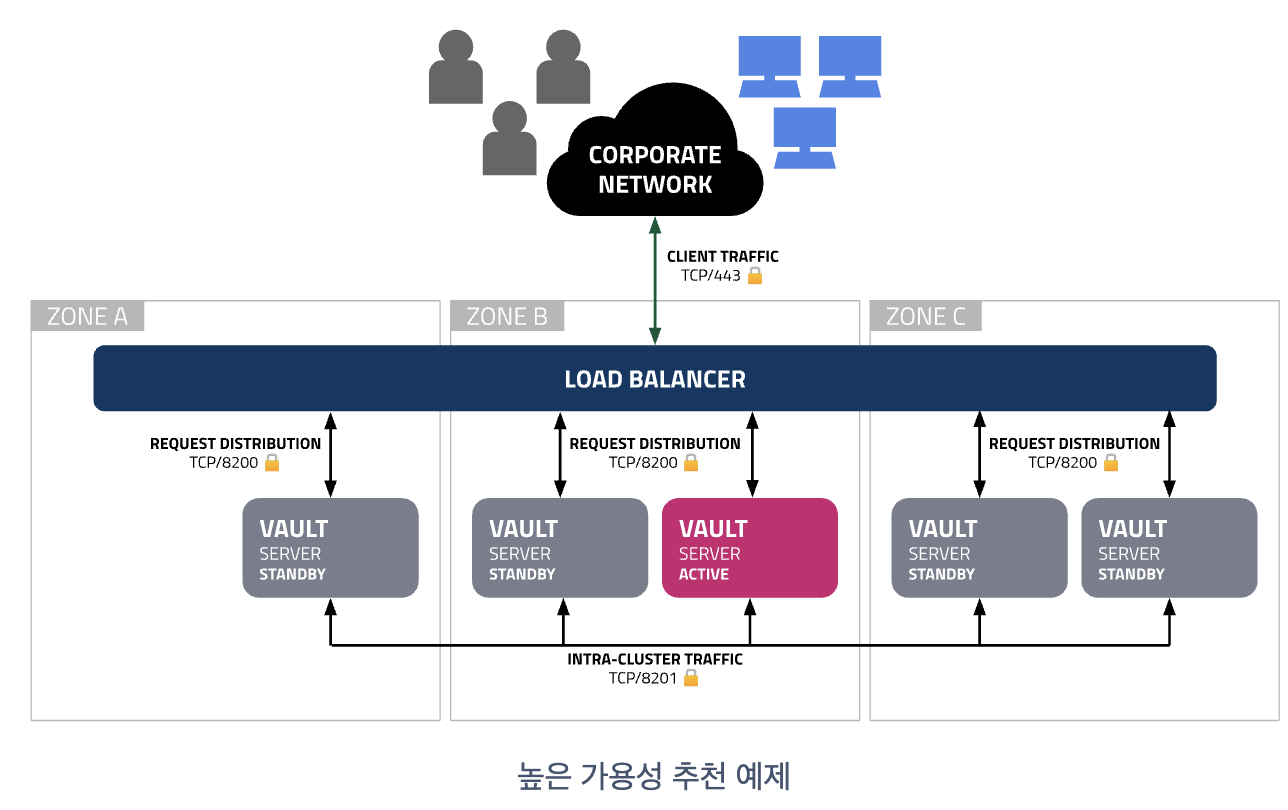
Vault 클러스터는 여러 Vault 서버를 실행하여 구성합니다.이는 Vault의 vault operator init 으로 수행됩니다.이 명령은 클러스터에 대한 unseal keys와 initial root token을 반환합니다.
키 공유 수와 키 임계값은 –key-shares 및 key-threshold 옵션을 사용하여 지정할 수 있습니다.
각 Vault 클러스터는 한 번 초기화해야 합니다.
각 Vault 서버는 시작할 때마다 봉인(Seal)을 해제해야 합니다.이는 클러스터를 초기화할 때 반환된 unseal keys를 사용하여 vault operator unseal 명령어로 수행됩니다.
봉인을 해제할 때까지 서버를 사용할 수 없습니다.
vault status 명령어로 상태 확인 가능하며 봉인 되었는지 아닌지 확인 가능합니다.
$ vault status
WARNING! VAULT_ADDR and -address unset. Defaulting to https://127.0.0.1:8200.
Error checking seal status: Get "https://127.0.0.1:8200/v1/sys/seal-status": http: server gave HTTP response to HTTPS client
$ export VAULT_ADDR='http://127.0.0.1:8200' # no tls for this test demo
$ vault status
Key             Value
---             -----
Seal Type       shamir
Initialized     true
Sealed          false
Total Shares    1
Threshold       1
Version         1.17.0
Build Date      2024-06-10T10:11:34Z
Storage Type    inmem
Cluster Name    vault-cluster-445bxxxx
Cluster ID      6748b197-b91c-89a2-36f3-a78cxxxxxxxx
HA Enabled      false
볼트 시크릿 엔진
대부분의 Vault 비밀 엔진은 명시적으로 활성화해야 합니다.각 비밀 엔진에는 기본 경로가 있습니다.그러면 CLI 명령 및 API 호출에서 사용자 지정 경로를 지정해야 합니다. vault write aws/config/root 대신 vault write aws-east/config/root
여러 인스턴스를 활성화하기 위해 대체 경로(path)를 지정할 수 있습니다. vault secrets enable -path=aws-east aws
vault secrets enable 명령어로 수행됩니다.
볼트 엔진 버전은 현재 두가지가 있습니다.
KV v1(버전 관리 없음)
KV v2(버전 관리 포함)
Dev mode는 Vault 서버에 대해 KV v2 엔진의 인스턴스가 자동으로 활성화됩니다.
Vault는 "Prod" mode 서버에서 KV 시크릿 엔진의 인스턴스를 자동으로 활성화하지 않습니다. 따라서 직접 활성화해야 합니다.
기본 경로 kv에 KV v2 secrets 엔진의 인스턴스를 마운트하는 방법 vault secrets enable -version=2 kv
vault kv list는 지정된 경로에 있는 보안 비밀을 나열합니다.vault kv get은 지정된 경로에서 보안 비밀을 읽습니다.
vault kv delete는 지정된 경로에서 보안 비밀을 삭제합니다.
vault kv put은 지정된 경로에 보안 비밀을 작성합니다.
볼트 인증
볼트 인증 방법은 유저, 어플리케이션 대상 두가지로 나눠져 있습니다.
Methods for UsersGitHubJWT/OIDC
Okta
LDAP
Userpass
Methods for ApplicationsAWSGoogle Cloud
Kubernetes
Azure
AppRole
대부분의 Vault 인증 방법은 명시적으로 활성화해야 합니다.각 인증 방법에는 기본 경로가 있습니다.CLI 명령 및 API 호출에서 사용자 지정 경로를 지정해야 합니다. vault write aws/config/root 대신 vault write aws-east/config/root
여러 인스턴스를 활성화하기 위해 대체 경로를 지정할 수 있습니다. vault auth enable -path=aws-east aws
이는 vault auth enable 명령어로 수행됩니다.
볼트 정책(Policy)
Vault Policies는 사용자와 애플리케이션이 액세스할 수 있는 secrets (비밀) 을 제한합니다.
Vault는 기본적으로 액세스를 거부하는 최소 권한 관행을 따릅니다.
Vault 관리자는 정책 설명을 사용하여 특정 경로에 대한 사용자 및 애플리케이션 액세스 권한을 명시적으로 부여해야 합니다.
경로를 지정하는 것 외에도 정책은 해당 경로에 대한 기능 집합도 지정합니다.
Policies 는 HashiCorpConfiguration Language (HCL)로 작성됩니다.
예시:
# Allow tokens to look up their own properties
path "auth/token/lookup-self" {
capabilities = ["read"]
}
정책 경로는 Vault API 경로에 매핑됩니다.
Vault의 CLI, UI 또는 API를 사용하여 Vault 서버에 Vault 정책을 추가할 수 있습니다.
$ vault server -dev
==> Vault server configuration:

Administrative Namespace:
             Api Address: http://127.0.0.1:8200
                     Cgo: disabled
         Cluster Address: https://127.0.0.1:8201
   Environment Variables: BASH_FUNC_which%%, DBUS_SESSION_BUS_ADDRESS, GOTRACEBACK, HISTCONTROL, HISTSIZE, HOME, HOSTNAME, LANG, LESSOPEN, LOGNAME, LS_COLORS, MAIL, MOTD_SHOWN, NVM_BIN, NVM_CD_FLAGS, NVM_DIR, NVM_INC, NVM_RC_VERSION, OLDPWD, PATH, PWD, SELINUX_LEVEL_REQUESTED, SELINUX_ROLE_REQUESTED, SELINUX_USE_CURRENT_RANGE, SHELL, SHLVL, SSH_CLIENT, SSH_CONNECTION, SSH_TTY, SYSTEMD_COLORS, S_COLORS, TERM, USER, XDG_RUNTIME_DIR, XDG_SESSION_CLASS, XDG_SESSION_ID, XDG_SESSION_TYPE, _, which_declare
              Go Version: go1.22.4
              Listener 1: tcp (addr: "127.0.0.1:8200", cluster address: "127.0.0.1:8201", disable_request_limiter: "false", max_request_duration: "1m30s", max_request_size: "33554432", tls: "disabled")
               Log Level:
                   Mlock: supported: true, enabled: false
           Recovery Mode: false
                 Storage: inmem
                 Version: Vault v1.17.0, built 2024-06-10T10:11:34Z
             Version Sha: 72850df1bc10581b74ba5f0f7b3xxxxxxxx

==> Vault server started! Log data will stream in below:
...
WARNING! dev mode is enabled! In this mode, Vault runs entirely in-memory
and starts unsealed with a single unseal key. The root token is already
authenticated to the CLI, so you can immediately begin using Vault.

You may need to set the following environment variables:

    $ export VAULT_ADDR='http://127.0.0.1:8200'

The unseal key and root token are displayed below in case you want to
seal/unseal the Vault or re-authenticate.

Unseal Key: lS0Xa99RlRkP/g2reElBKYhnJggXcOtxxxxxxxxx
Root Token: hvs.EI1TksGnXihdxxxxxxxx

Development mode should NOT be used in production installations!
볼트 서버 상태를 확인합니다.
$ export VAULT_ADDR='http://127.0.0.1:8200'
$ vault status
Key             Value
---             -----
Seal Type       shamir
Initialized     true
Sealed          false
Total Shares    1
Threshold       1
Version         1.17.0
Build Date      2024-06-10T10:11:34Z
Storage Type    inmem
Cluster Name    vault-cluster-44xxxxx
Cluster ID      6748b197-b91c-89a2-36f3-axxxxxxxx
HA Enabled      false
key value 로 시크릿을 생성하기 위해 kv 명령어를 실행합니다.
$ vault kv put -mount=secret hello team=banana
== Secret Path ==
secret/data/hello

======= Metadata =======
Key                Value
---                -----
created_time       2024-06-23T06:53:49.203123729Z
custom_metadata    <nil>
deletion_time      n/a
destroyed          false
version            1
dev 모드로 볼트 서버를 시작한 경우, 기본 Mount path은 자동으로 생성됩니다.
data hello가 secret/data/hello 로 key value 로 마운트 되었습니다.
kv put으로 여러 key value를 입력할 수 있습니다.
$ vault kv put -mount=secret hello team=banana homework=yes
== Secret Path ==
secret/data/hello

======= Metadata =======
Key                Value
---                -----
created_time       2024-06-23T06:57:10.424550787Z
custom_metadata    <nil>
deletion_time      n/a
destroyed          false
version            2
이제 시크릿을 get 으로 읽어봅니다.
$ vault kv get -mount=secret hello
== Secret Path ==
secret/data/hello

======= Metadata =======
Key                Value
---                -----
created_time       2024-06-23T06:57:10.424550787Z
custom_metadata    <nil>
deletion_time      n/a
destroyed          false
version            2

====== Data ======
Key         Value
---         -----
homework    yes
team        banana
특정 키의 value 값만 읽습니다. 옵션과 명령어 넣을때 순서를 인식합니다.
$ vault kv get -mount=secret hello -field=homework
Command flags must be provided before positional arguments. The following arguments will not be parsed as flags: [-field=homework]
Too many arguments (expected 1, got 2)
$ vault kv get -mount=secret -field=homework hello
yes
이제 AWS 엔진을 활성화 하고 동적 AWS 시크릿을 생성해 봅니다.
동적 비밀은 액세스할 때 생성됩니다. 동적 시크릿은 읽을 때까지 존재하지 않으므로 누군가가 이를 훔치거나 동일한 비밀을 사용하는 다른 클라이언트가 발생할 위험이 없습니다.
Vault에는 취소 메커니즘이 내장되어 있으므로 동적 시크릿은 사용 후 즉시 취소되어 비밀이 존재하는 시간을 최소화할 수 있습니다.
참고로 STS 페더레이션 토큰을 사용하려는 경우 IAM 역할 자격 증명으로 볼트를 인증할 수 없습니다.
역할과 연결된 임시 보안 자격 증명에는 GetFederationToken을 사용할 권한이 없기 때문입니다.
대안으로 identity token audience 를 사용하는 방법이 있는데 무료 커뮤니티 버전은 지원이 안됩니다.
$ vault write aws/config/root \
    identity_token_audience="http://127.0.0.1:8200" \
    role_arn="arn:aws:iam::539666729110:role/gepp-demo01-ssm-assume-ec2-role"
Error writing data to aws/config/root: Error making API request.

URL: PUT http://127.0.0.1:8200/v1/aws/config/root
Code: 400. Errors:

* failed to generate plugin identity token: plugin workload identity not supported in Vault community edition
export 한 access key value를 써서 구성해봅니다.
$ vault write aws/config/root \
    access_key=$AWS_ACCESS_KEY_ID \
    secret_key=$AWS_SECRET_ACCESS_KEY \
    region=ap-southeast-1
Success! Data written to: aws/config/root
이제 IAM Role을 생성해봅니다. 크레덴셜이 가리키는 유저가 수행할 역할이며 ec2 에 대한 권한을 주었습니다.
이제 명령어 pulumi new aws-typscript 를 사용하여 새 프로젝트를 생성합니다.
$ pulumi new aws-typescript
Manage your Pulumi stacks by logging in.
Run `pulumi login --help` for alternative login options.
Enter your access token from https://app.pulumi.com/account/tokens
    or hit  to log in using your browser                   :


  Welcome to Pulumi!

  Pulumi helps you create, deploy, and manage infrastructure on any cloud using
  your favorite language. You can get started today with Pulumi at:

      https://www.pulumi.com/docs/get-started/

  Tip: Resources you create with Pulumi are given unique names (a randomly
  generated suffix) by default. To learn more about auto-naming or customizing resource
  names see https://www.pulumi.com/docs/intro/concepts/resources/#autonaming.


This command will walk you through creating a new Pulumi project.

Enter a value or leave blank to accept the (default), and press .
Press ^C at any time to quit.

project name (project): aws-create-s3-with-ts
project description (A minimal AWS TypeScript Pulumi program): cnp demo for pulumi
Created project 'aws-create-s3-with-ts'

Please enter your desired stack name.
To create a stack in an organization, use the format / (e.g. `acmecorp/dev`).
stack name (dev): dev
Created stack 'dev'

The packagemangager to use for installing dependencies npm
aws:region: The AWS region to deploy into (us-east-1): ap-southeast-1
Saved config

Installing dependencies...
added 422 packages, and audited 423 packages in 4m

60 packages are looking for funding
  run `npm fund` for details

found 0 vulnerabilities
Finished installing dependencies

Your new project is ready to go!

To perform an initial deployment, run `pulumi up`

$ ls
Pulumi.dev.yaml  Pulumi.yaml  index.ts  node_modules  package-lock.json  package.json  tsconfig.json
$ cat index.ts
import * as pulumi from "@pulumi/pulumi";
import * as aws from "@pulumi/aws";
import * as awsx from "@pulumi/awsx";

// Create an AWS resource (S3 Bucket)
const bucket = new aws.s3.Bucket("gepp-demo01-pulumi-test-bucket01");

// Export the name of the bucket
export const bucketName = bucket.id;
aws 에러를 피하기 위해 pulumi up을 하기전에 먼저 크레덴셜이 정상적으로 s3 리소스로 접근 가능한지 테스트 해봅니다.
aws s3 ls
이제 스택 배포 및 버킷 생성을 하기 위해 pulumi up 명령어를 실행합니다.
$ pulumi up
Previewing update (dev)

View in Browser (Ctrl+O): https://app.pulumi.com/INSANECRAB/aws-create-s3-with-ts/dev/previews/b929de47-a0e9-4f72-88c4-7ddexxxxxxx

     Type                 Name                            Plan
 +   pulumi:pulumi:Stack  aws-create-s3-with-ts-dev       create
 +   └─ aws:s3:Bucket     gepp-demo01-pulumi-test-bucket01  create

Outputs:
    bucketName: output

Resources:
    + 2 to create

Do you want to perform this update? yes
Updating (dev)

View in Browser (Ctrl+O): https://app.pulumi.com/INSANECRAB/aws-create-s3-with-ts/dev/updates/1

     Type                 Name                            Status
 +   pulumi:pulumi:Stack  aws-create-s3-with-ts-dev       created (7s)
 +   └─ aws:s3:Bucket     gepp-demo01-pulumi-test-bucket01  created (1s)

Outputs:
    bucketName: "gepp-demo01-pulumi-test-bucket01-ffa34xx"

Resources:
    + 2 created

Duration: 9s

$ aws s3 ls | grep gepp-demo
2024-06-23 15:36:30 gepp-demo01-pulumi-test-bucket01-ffa34xx
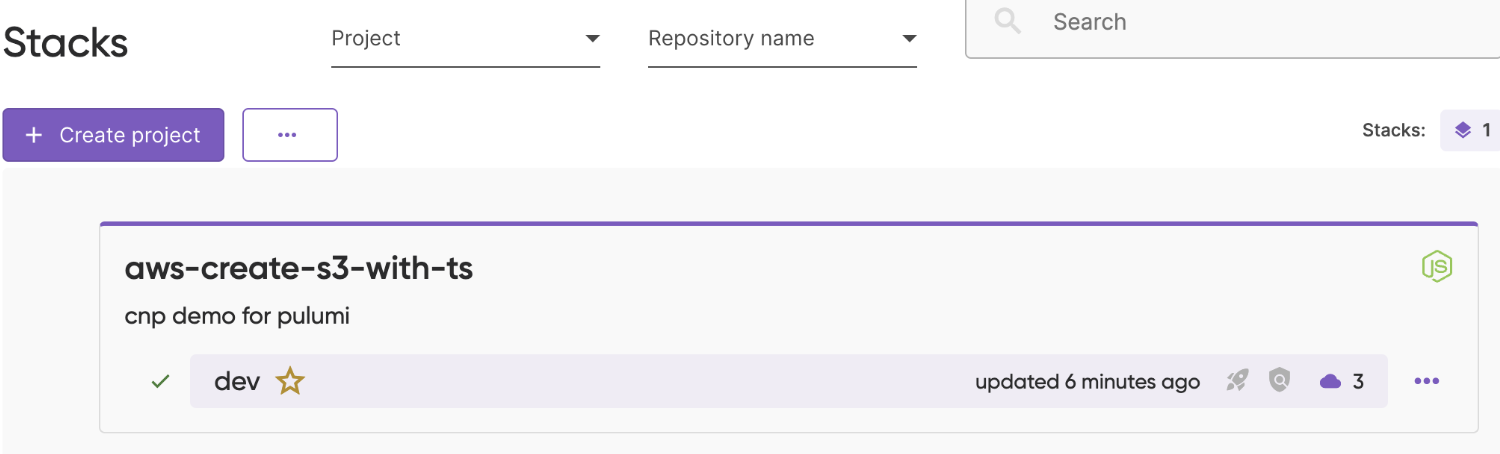
Pulumi Console 에서 방금 배포한 내용이 확인됩니다.
참고 문서
dynamic credentials with AWS OIDC 를 위해 pulumi yaml 에 아래와 같은 설정을 추가할 수도 있습니다.
# Modify .zshrc file

alias <alias name>='ssh -i <your key file name>.pem <username>@<public EC2 IP> -p <public EC2 port> \
	-g -L <local port which is not in use>:<target domain name>:<target port> \
    -g -L <local port which is not in use>:<target domain name>:<target port>'
source .zshrc
<type alias name>
터미널에서 Public EC2 에 들어가지면 브라우저에서 <접속할 타겟 도메인>:<지정한 로컬포트> 로 입력합니다.